
Problem
The app needed a modernized experience that feels simple and fast. The goal was to reduce friction in ordering, surface loyalty and rewards at the right moments, and keep the interface consistent across the browsing and checkout flows.
Collaborated with BJ's team at Silicon Prime to refresh their mobile app, improving ordering ease and consistency through clean UI/UX and better navigation.
BJ's Restaurant is a popular American casual dining chain with over 200 locations in the United States. It is known for a large menu and a strong focus on customer satisfaction in store and on digital platforms.
The app needed a modernized experience that feels simple and fast. The goal was to reduce friction in ordering, surface loyalty and rewards at the right moments, and keep the interface consistent across the browsing and checkout flows.
Create a warm and intuitive ordering experience that balances speed with BJ's casual-brewhouse vibe for both in-store and online ordering.
Product Designer
I created a modernized mobile experience focused on core ordering flows.
Because this was a client project with limited access to BJ's customers, I used desk research and review mining from app stores, competitor scan, and a heuristic audit of the ordering flow. The goal was to identify repeated friction points and turn them into clear UI opportunities.
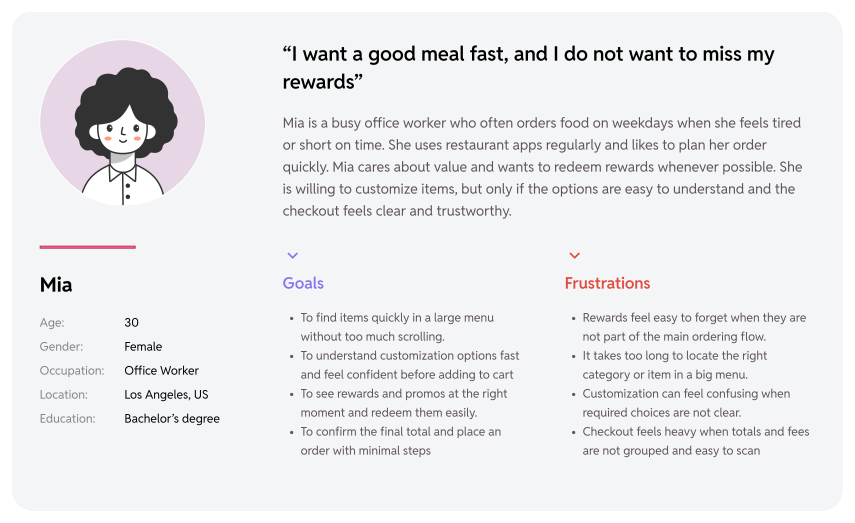
I created personas based on patterns from review mining and common ordering scenarios. The goal was to represent real motivations in a casual dining app, then design UI that supports quick decisions, confidence, and rewards usage.
To resolve customer issues quickly and effectively in an app in a fast and clear way.
Many customers do not notice how to earn or redeem points while ordering. Rewards information feels separated from the main flow, so users forget to use it at checkout.
The menu is extensive, which increases scrolling and searching. When categories, filters, and search do not guide users fast enough, people spend more time looking than deciding.
At checkout, users want stronger clarity about totals and fees, and a faster way to confirm the order. When key information is not grouped well, users recheck details and hesitate before placing the order.
Here I built some schemes and storyboards to clarify and understand information and architecture of the app. After I created paper wire-frames and then proceeded with building digital wireframes with a low-fidelity prototype in order to conduct first usability studies with stakeholders.
They initially oriented on the basic structure of the homepage and highlight the intended function of each element.
Here, I sketched the key pages including the inbox, tickets, customer profile, and others. The goal was to explore different ideas with wireframes.
Users cannot find items fast in a large menu.
Simplified menu structure and made browsing more scannable.
Search and filters do not help enough.
Improved search entry and added clearer filtering patterns.
Rewards are easy to miss during ordering.
Surfaced rewards in cart and checkout with clear redemption.
Required modifiers are easy to overlook.
Grouped options and highlighted required choices.
Checkout feels heavy and unclear.
Rebuilt checkout hierarchy with a clear total breakdown.
On this step, first I created a static, high-fidelity app design (keeping in mind all the conclusions from the previous phase of usability studies) that is a clear representation of a final product called design mockups. After that, I created a high-fidelity prototype of the app.
I created all the app pages mockups, incorporating the right design elements such as typography, color, and iconography. Also I developed all the necessary components and needed elements. The goal was to demonstrate the final Suplan app in as much detail as possible.
Design System:
These are a high fidelity design that represents a final product
These flows show how the redesign improves the most important parts of the ordering experience, from finding items and applying rewards to customizing meals and completing checkout with more confidence.
BJ's has a large menu. Users need to find items fast with less scrolling, and rewards should not be missed during the ordering path.
I designed a discovery flow that balances visual browsing with efficient navigation: a category-based navigation, searchable item cards, smart filters, and persistent search to help users find what they need quickly.
Item customization can slow users down when required choices are not obvious and options feel overwhelming. Users need confidence that selections and price are correct before adding an item.
I designed a structured customization flow that makes choices clear and completion effortless, with clearly labeled required steps, scannable option modules with visible "Done" states, inline review of selected values, timely add-on suggestions that don't block the main task, and a persistent quantity and "Add to order" bar to keep the next action always visible.
Checkout is a high-intent moment. Users need to review items, understand the total, apply rewards, and complete payment without confusion. Dense layouts increase drop-off.
I turned the mockups into a prototype that was ready for testing. Using gestures and motion helped enrich the user experience and improve usability of the ordering flow.
We delivered a modernized BJ's mobile app experience focused on the core ordering flow. The redesign improves menu discoverability, makes customization clearer, and simplifies checkout so users can place orders with more confidence. The UI system also helps keep screens consistent across iOS and Android and supports future updates faster.
This project showed that small UI decisions can remove major friction in food ordering. Clear hierarchy, strong navigation, and the right placement of rewards can reduce hesitation and help users complete orders faster.
It's the detailed, interactive version of designs that closely match the look and feel of the final product.
The redesign created a more consistent and user friendly ordering journey, especially from menu browsing to checkout. Key improvements include faster item discovery, clearer modifier steps, and a checkout layout that is easier to scan and verify.
Run usability testing on menu findability, modifier comprehension, and checkout confidence.
Even small changes in structure and wording can significantly improve speed and confidence in high intent flows. I learned to design for scanning first, then details, and to place rewards exactly where users make payment decisions.
Track key metrics such as time to add item, rewards redemption rate, and checkout completion rate.